
 Español
 Deutsch
 Français
 Português (Brasil)
 Türkçe
 Русский
 简体中文
简体中文 日本語
日本語Docker apps
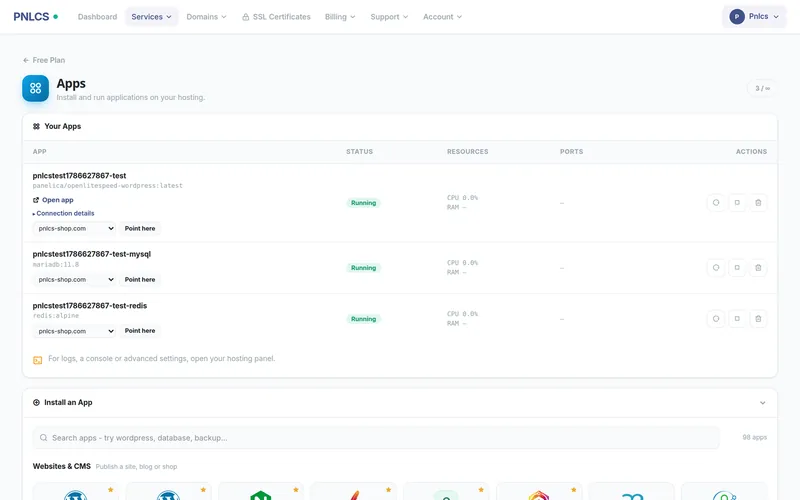
Customers install WordPress, n8n, databases or remote desktops from a catalog. Each app runs as Docker containers inside the customer’s hosting account, within the memory and CPU of their plan. Requires a Panelica server.
Three ways to sell apps
They can be combined.
- Hosting with apps included
- A normal hosting plan with a container allowance. Customers get a website and can add apps from the Apps tab at any time.
- App hosting
- The order installs one app on the customer’s domain. Fix the app (“Managed WordPress”) or let the customer pick from your catalog, so one product covers every app.
- Container plan
- Resources without a website: no domain, and the service page shows only the Apps tab.
Some of the apps in the catalog
The catalog comes from the Panelica server; 95 of its 98 apps ship with a logo.
 WordPress
 n8n
n8n Nextcloud
 Ghost
Ghost Gitea
Gitea Grafana
 Uptime Kuma
 Vaultwarden
 Immich
 Jellyfin
 Matomo
 Umami
Umami Node-RED
 Home Assistant
 Open WebUI
 Ollama
 MinIO
MinIO Metabase
 PostgreSQL
 Redis
Redis MariaDB
 Drupal
 ONLYOFFICE
 code-server
Each account’s apps share one cgroup limit
Every container a customer starts is created inside their account’s cgroup slice. A customer on a 2 GB plan has 2 GB across all their apps and cannot use another customer’s memory.
- No privileged containers, extra capabilities or host-path mounts, even for the billing key
- Plans set the number of apps, total memory and total CPU
- Customers see an app’s memory needs before they order
- An order that cannot install its app is rolled back, never left half-built
You curate the catalog
The Panelica server decides which apps exist. PNLCS decides how you sell them: which apps you offer, which are featured, their order, tagline and logo.
- Connect a Panelica serverWith an API key that carries the Docker scopes.
- Choose how to sellIncluded, app hosting, or container plan.
- Build the productSet the container allowance, memory and CPU, then the price.
- Curate the catalogOffer, feature and order apps; 95 of 98 have a logo out of the box.
Try PNLCS
Click around the live demo, or install it with Docker.