
 Español
 Deutsch
 Français
 Português (Brasil)
 Türkçe
 Русский
 简体中文
简体中文 日本語
日本語Open-source billing for hosting companies
A free, self-hosted WHMCS alternative. Invoicing, domains, SSL, support tickets, shared hosting, Docker apps and Proxmox VPS in one application, maintained by the Panelica team and volunteers.

Built with
Laravel 13, PHP 8.4+, MySQL 8 or MariaDB, Tailwind CSS 4 and Alpine.js. Official Docker image.
Project status
- License
- MIT
- GitHub stars
- 59
- Contributors


 6
6- Last update
- 2026-09-25
- Docker pulls
- 3.1k
Who builds PNLCS
Panelica maintains PNLCS together with volunteers. Everyone below has changes merged into the code, and the list updates itself from GitHub.


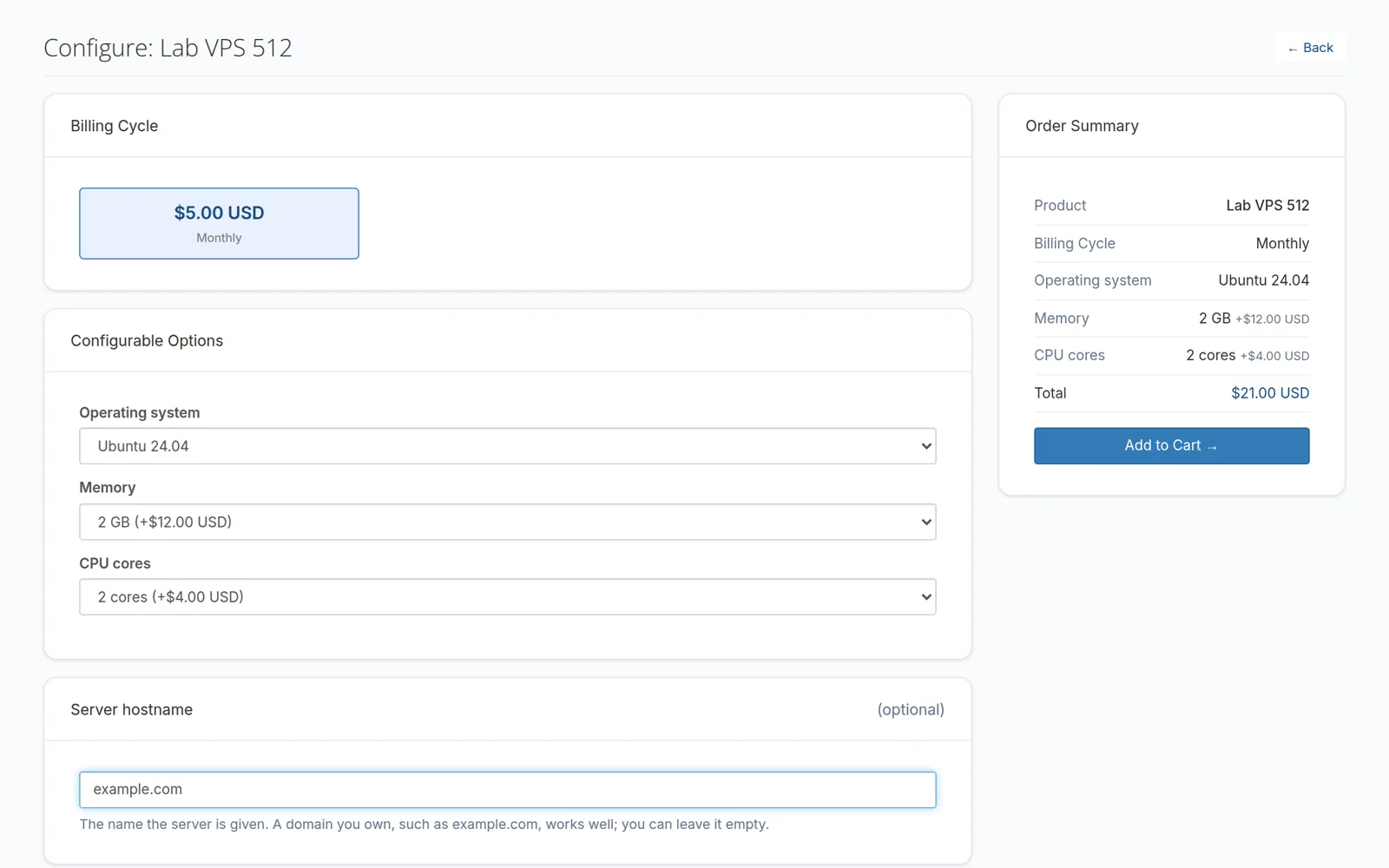
What PNLCS does, on real screens
Pick a feature to see its screen.
What happens to a renewal
PNLCS runs billing on a schedule, so nobody has to remember to send an invoice or switch off an unpaid account. These are the defaults; every number is a setting.
-
14 days before
Renewal invoice
Created and emailed to the customer.
invoice_days_before_due = 14 -
3 days before
Stored card charged
If you turn auto-charge on. Up to 3 attempts, 3 days apart.
AutoChargeDaysBefore = 3 -
Due date
Reminders
Unpaid invoices turn overdue and reminder emails go out. An optional late fee applies after 3 days.
LateFeeMinDays = 3 -
3 days after
Suspended
The service is suspended on the server. Paying unsuspends it within 30 minutes.
AutoSuspensionDays = 3 -
30 days after
Terminated
Only if you enable it. Off by default.
AutoTerminationDays = 30
Integrations that ship with PNLCS
Control panels, payment gateways, domain registrars and SSL, all included as readable source.
Servers and panels 7
 Panelica
 cPanel / WHM
 Plesk
Plesk DirectAdmin
 HestiaCP
- Proxmox VE
- Vultr
Payment gateways 8
- Stripe
- PayPal
 Authorize.net
 Mollie
- Razorpay
 iyzico
 Tpay
Tpay- Bank transfer
Domain registrars 6
- Namecheap
 Enom
Enom ResellerClub
 OpenProvider
 DomainNameApi
 HRD
HRD
SSL and add-ons 5
 GoGetSSL
- Company lookup
- KSeF e-invoicing
- Project management
- Staff board
Sixteen themes, switchable from the admin panel
Install and activate themes the way you would in WordPress. Pick one to see its colours on an example storefront.
Browse all themesInstall with Docker
One application container and one database container. The install wizard does the rest.
- Start the containersReplace
changemewith your own passwords first. - Wait 3 to 5 minutesThe first start installs dependencies and builds the frontend.
- Open /installThe wizard checks requirements, creates your admin account, then locks itself.
$ docker network create pnlcs-net

$ docker run -d --name pnlcs-db --network pnlcs-net \
  -e MYSQL_ROOT_PASSWORD=changeme \
  -e MYSQL_DATABASE=pnlcs -e MYSQL_USER=pnlcs \
  -e MYSQL_PASSWORD=changeme \
  mariadb:11

$ docker run -d --name pnlcs --network pnlcs-net \
  -p 8090:80 \
  -e DB_HOST=pnlcs-db -e DB_DATABASE=pnlcs \
  -e DB_USERNAME=pnlcs -e DB_PASSWORD=changeme \
  -e APP_URL=http://localhost:8090 \
  panelica/pnlcs-runtime:1.4
Try PNLCS
Click around the live demo, or install it with Docker.